
Norton AntiVirus Plus: what the entry tier really covers, and who it is for
This article contains paid partner links to Norton. If you buy a subscription after following one, Burksled s.r.o. receives a commission from the advertiser; you pay exactly what you would pay going direct. The commission does not change a word of what is written here, and this page recommends against buying the product in several specific situations. Burksled s.r.o. is an independent publisher and is not affiliated with, endorsed by or sponsored by Norton or Gen Digital Inc. See the editorial policy, how we research and the affiliate disclosure.
Norton AntiVirus Plus is the cheapest way into Gen Digital’s consumer security range, and it is also the product people most often buy by mistake — usually because they believe a VPN or a family licence is included. Neither is. This article sets out what the tier actually contains, explains the machinery behind the marketing vocabulary, shows how the billing runs over two years, and gives you a way of deciding whether you need any of it.
One device. Windows or macOS, not phones. A very good malware scanner, a firewall with outbound control, a password manager and a small cloud backup allowance. No VPN. The first year is discounted and it renews at a higher standard rate unless you turn that off. If you have one computer, keep it updated, and want someone else to make the security decisions, it is a sensible purchase. If you want a VPN or cover for a household, it is the wrong product and a Norton 360 tier is the comparison to make.
- ProductNorton AntiVirus Plus — the entry tier of the Norton consumer range
- VendorGen Digital Inc., the company formed when NortonLifeLock and Avast merged in 2022
- PlatformsWindows and macOS. It is not an Android or iOS product.
- Devices coveredMarketed as a single-device subscription — one PC or one Mac
- BillingAnnual subscription, discounted first term, automatic renewal at the standard rate unless cancelled
- Not in this tierSecure VPN, Dark Web Monitoring, SafeCam, parental controls, identity-theft cover
- Before you buyDevice counts, storage allowances, guarantee periods and prices differ by country and by promotion. Norton’s own product page and order screen are authoritative. Where this page and Norton diverge, Norton’s information prevails.
Where this tier sits in the Norton range
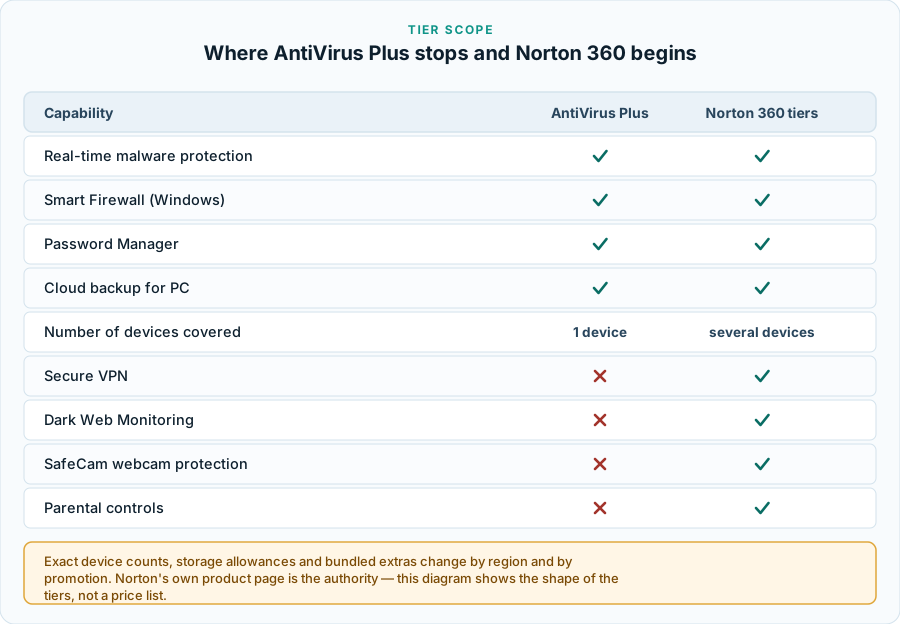
Norton does not sell one product. It sells a ladder of subscription tiers, and AntiVirus Plus is the bottom rung. Everything above it carries the Norton 360 name and adds services rather than a different scanner: more devices on the licence, more cloud storage, a VPN, monitoring services, and in some countries identity-theft cover.
That distinction matters more than the marketing makes clear. Buying the entry tier does not buy you a weaker engine — the core malware protection is substantially common across the range. Equally, paying for an upper tier in the hope of better detection is paying for the wrong thing. You are buying breadth of service and number of licences, not a better scanner.
What the subscription includes
Based on Norton’s published description of the tier at the time of writing, an AntiVirus Plus subscription provides the following.
- Real-time malware protection. Files are inspected as they are written, opened and executed, rather than only when a scheduled scan happens to run. This is the part that does the actual work.
- Smart Firewall on Windows. A firewall that controls which programs on the machine may talk out to the network, in addition to the inbound filtering Windows already performs. On macOS the platform’s own firewall is used instead, so this component is materially a Windows feature.
- Password Manager. A browser-integrated vault for credentials. It is a genuine password manager rather than a wrapper around browser autofill, but it is tied to the Norton account, which is worth thinking about before you move a decade of logins into it.
- Cloud backup for PC. A small storage allowance — Norton lists 2 GB for this tier — for selected documents and photos. It is Windows-only and it is sized for personal files, not for imaging a disk.
- Virus Protection Promise. Norton’s commitment that if a device covered by an eligible subscription is infected and their support team cannot remove the infection, they will refund the subscription. It is a support and refund commitment with published conditions attached. It is not, and is not offered as, a guarantee that nothing will ever get through.
Storage allowances and device counts in this range have changed more than once, and they differ between the Czech, other EU and US storefronts. Treat the 2 GB figure as Norton’s listed allowance at the time of writing and confirm it on the order screen before you pay. We do not restate vendor figures we cannot check on the day you read the page.
This is a paid partner link. If you subscribe after following it, Burksled s.r.o. receives a commission from the advertiser. It costs you nothing extra and does not change the price you are shown.
What it does not include
This is where most descriptions of the product go wrong, including an earlier version of this page. The following are not part of AntiVirus Plus.
- Norton Secure VPN. A Norton 360 component. If a VPN is what you want, this is the wrong purchase and you will end up paying for a second subscription.
- Multi-device and mobile coverage. A single-device licence for one PC or one Mac. Phones and tablets are not covered.
- Dark Web Monitoring, which checks whether your credentials appear in known breach data.
- SafeCam webcam-access alerts and parental controls.
- Identity-theft protection. The LifeLock-branded services are a separate product line with limited country availability, and in much of Europe they are not sold at all.
One computer and a wish for managed malware protection? This is the product Norton designed for you. A household of laptops, phones and tablets, or a specific need for a VPN? The entry tier will not stretch to it, and buying it first usually costs more in the end than comparing the Norton 360 tiers properly at the outset.
What your computer already does without it
An honest article about paid security software has to start from what you already have, because on a current, updated desktop operating system that is not nothing. Windows ships with a built-in antivirus engine that is on by default and has scored competitively in the same public laboratory tests discussed below. Both Windows and macOS ship an inbound firewall, automatic security updates, disk encryption capability, browser warnings for known-bad sites, and sandboxing that limits what an application can reach.
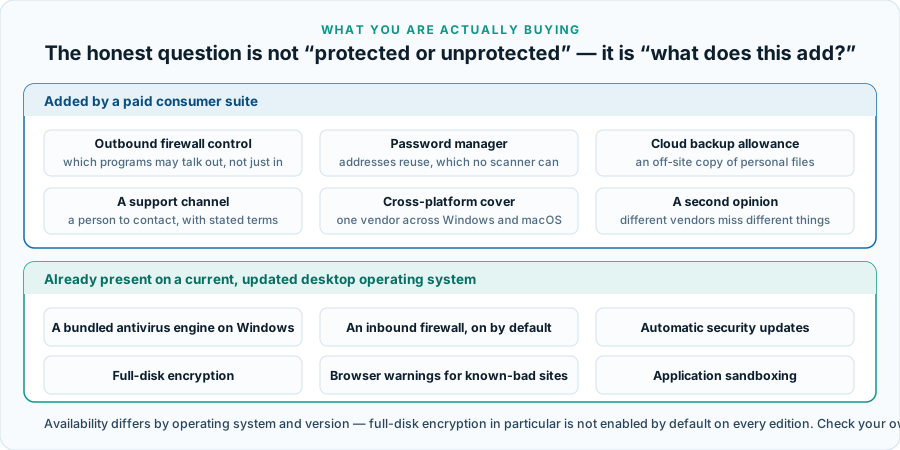
The arguments for paying on top of that baseline are narrower than advertising suggests, but they are real: a password manager addresses credential reuse, which no scanner can touch; outbound firewall control is a genuine addition; a Mac in the household is outside Windows’ built-in antivirus entirely; and a paid subscription comes with a support channel and a stated removal-or-refund commitment, where free software comes with a forum. What is not a good argument is the suggestion that a machine without a third-party suite is defenceless. It is not, and a page that tells you otherwise is selling something.
How the detection engine works
“Antivirus” is a legacy name. No serious consumer product relies on matching known virus signatures alone, because attackers recompile and repack payloads faster than signature lists can be distributed. What modern engines run — Norton’s included — is a sequence of independent checks, each catching a class of threat the others miss.
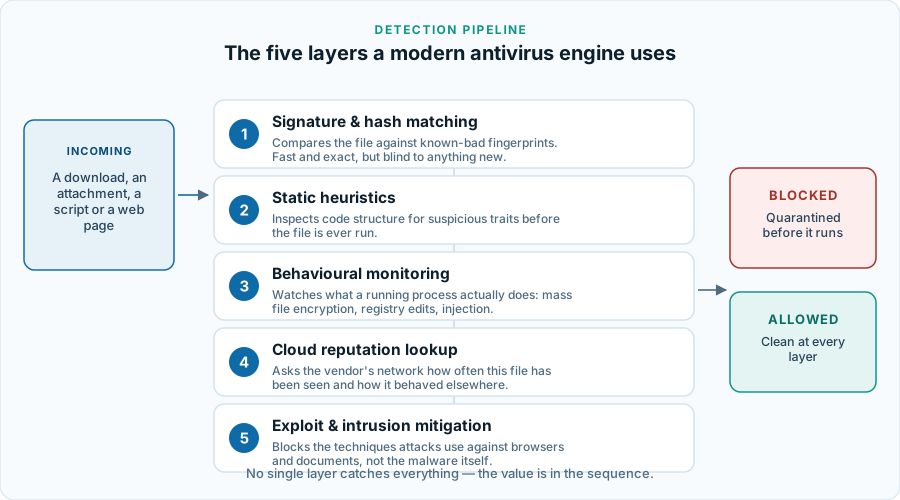
Signature and hash matching
The oldest technique: compare the file against fingerprints of known-bad code. Fast, exact, almost no false positives — and useless against anything the vendor has not seen before.
Static heuristics
Inspecting a file’s structure without running it: packing, obfuscation, unusual imports, a document containing a macro that contacts the network. This catches variants of known families, and it is the layer most likely to flag a legitimate but unusual program by mistake.
Behavioural monitoring
Watching what a process does once it is running — enumerating and rewriting large numbers of files, injecting into another process, deleting shadow copies, disabling recovery. This is the layer that stops ransomware families nobody has catalogued yet, because here the behaviour is the signature.
Cloud reputation
The engine asks the vendor’s network what it knows about this exact file: how many installations have seen it, how old it is, how it behaved elsewhere. A binary first observed four minutes ago on three machines worldwide is treated very differently from one seen on twenty million machines for three years. This is also the layer with the clearest privacy implications, because it means file metadata leaves your machine. Norton documents this in its own privacy notices and it is worth reading them before you install.
Exploit mitigation
Blocking the techniques an attack uses to gain execution through a flaw in a browser, a document reader or an office application. It does not repair the underlying flaw — only the software vendor’s own update does that. Security software is a complement to patching, never a substitute for it.
What happens when the scanner is wrong
Every detection layer that can catch something unknown can also be wrong about something harmless, and the consumer-facing consequences of that are rarely discussed in product copy. A false positive typically means a file is quarantined: moved out of reach, not deleted, with a restore option in the product’s history or quarantine view. The uncomfortable cases are a scanner quarantining part of a program you depend on, or flagging a file in a shared folder that other people also use.
Three practical points. First, the laboratory category called usability is precisely the false-positive rate, and a product that scores badly there is training you to click “allow” — which eventually undoes the protection you paid for. Second, before overriding any detection, check the file with a second opinion rather than trusting your own certainty about where it came from. Third, exclusions are a real tool but a sharp one: excluding a whole drive or a whole download folder to stop an annoying prompt removes protection from the exact place it is most needed.
How threats actually reach home users
The common assumption is that infection follows from downloading something disreputable. In practice the routes that matter for ordinary home users are broader, and several of them involve no download at all. European reporting from ENISA and Europol’s IOCTA series consistently places social engineering, credential abuse and exploitation of unpatched software among the dominant routes, rather than classic file-borne viruses.
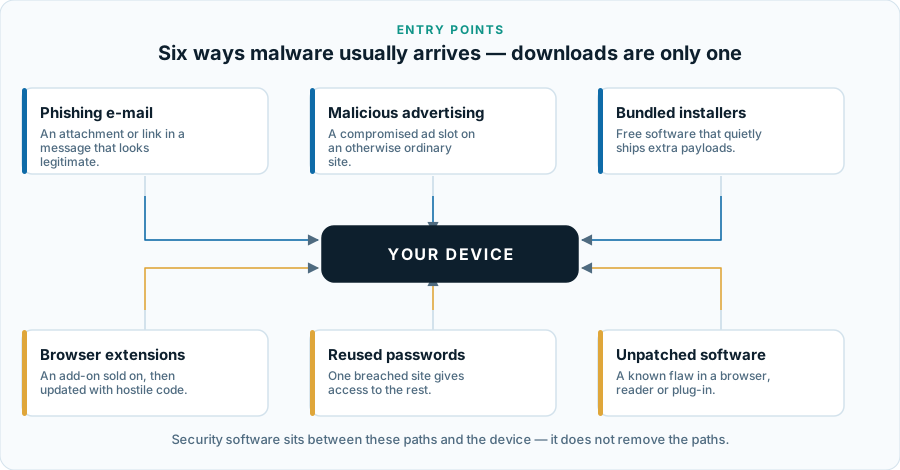
Two of those six are not malware problems at all. Reused passwords are a credential problem: no scanner can help when somebody signs in to your account with the correct password — which is the honest case for the bundled password manager, and the subject of our guide to passwords and second factors. Unpatched software is a maintenance problem, solved by enabling automatic updates and costing nothing. Phishing is a judgement problem; our guide to recognising fraudulent messages covers the recurring signals.
Ransomware, and why backup is the real answer
Ransomware is the threat most often used to sell consumer security software, and the one where software alone is least sufficient. An attack proceeds in stages and a defence can interrupt it at several of them — but once encryption has completed, no security product can undo it.
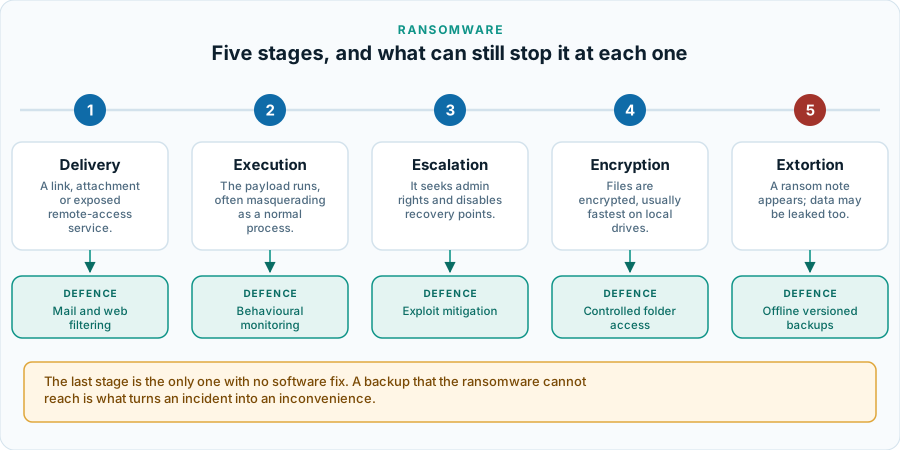
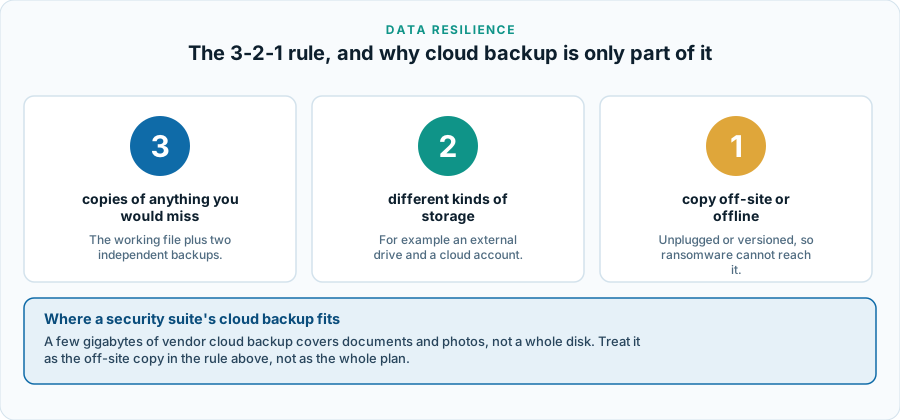
This is the context in which to read a cloud-backup allowance. A couple of gigabytes is not a disaster-recovery plan, but it is a meaningful off-site copy of the files most people would actually miss: documents, tax records, photographs. Sized honestly, it is one leg of the long-standing 3-2-1 rule that backup practitioners and CISA’s StopRansomware guidance both recommend.
This is a paid partner link. If you subscribe after following it, Burksled s.r.o. receives a commission from the advertiser. It costs you nothing extra and does not change the price you are shown.
Reading independent laboratory scores
Three laboratories dominate consumer antivirus testing in Europe: AV-TEST in Germany, AV-Comparatives in Austria, and SE Labs in the United Kingdom. Norton’s consumer engine has been a regular participant in their public test rounds and has generally scored well in them. We deliberately do not reproduce a specific percentage on this page: figures change with every test round, and a number quoted without its test date and sample set is close to meaningless.
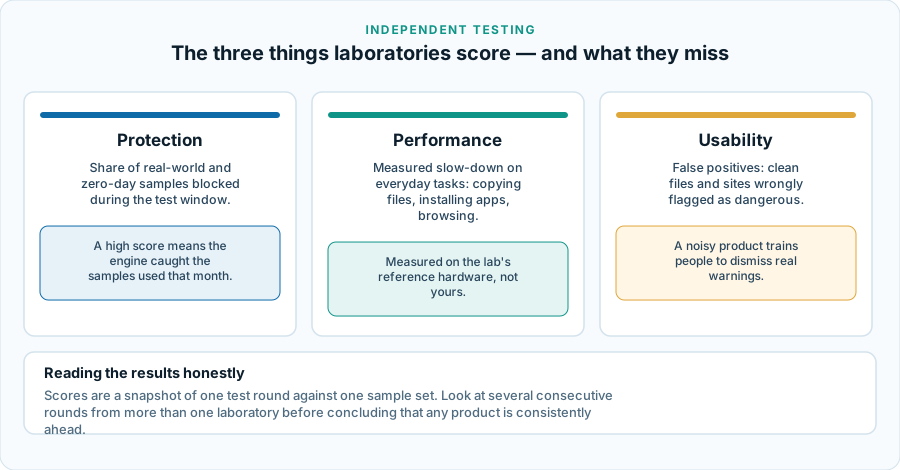
How to use these sources properly: open the laboratory’s own site rather than a summary of it, look at three or four consecutive rounds instead of one, and read all three categories. Note also that the leading consumer engines cluster tightly at the top; the practical gap between the best few is usually narrower than marketing on any side suggests. Our longer explainer, how to read an antivirus laboratory test, goes through a report page by page.
Performance impact on a real machine
The complaint that security software makes a computer sluggish is decades old and is now largely historical on current hardware. Real-time scanning costs most during bulk file operations — unpacking a large archive, installing software, the first full scan after installation — and relatively little during ordinary use. On a machine with an SSD and 8 GB of memory or more, most users will not notice it.
Two situations still deserve attention. Older laptops with mechanical hard drives, where a full scan is genuinely disruptive and should be scheduled for idle hours. And developer or build machines, where scanning large working directories adds real time to compilation and a narrow, considered exclusion is appropriate — narrow being the operative word, for the reasons in the false-positives section above. If you want figures rather than impressions, the performance category in the laboratory reports is the place to look, measured on their reference hardware rather than yours.
How the billing actually runs
We do not publish prices on this page. Consumer security subscriptions are sold on rotating promotions and any figure printed here would be wrong within weeks. What is stable is the structure, and the structure is where people are caught out.
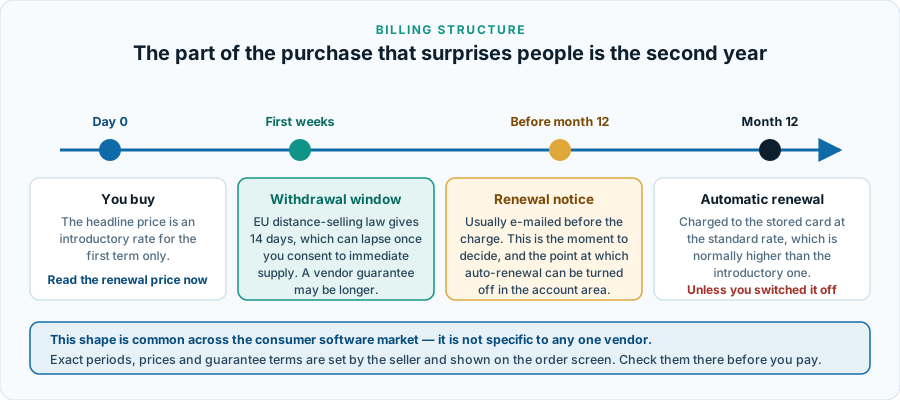
- The first term is discounted. The advertised headline price is almost always an introductory rate for the first year.
- It auto-renews at the standard rate. Disclosed in the terms; people are surprised by it anyway. Check the renewal price on the order screen, not just the price you are paying today.
- You can turn auto-renewal off in the Norton account area, generally without losing the term you have already paid for.
- Money-back guarantee. Norton advertises a money-back guarantee on annual subscriptions — commonly 60 days — with its own published conditions. Verify the current period and its conditions at the point of purchase rather than taking it from any third-party page, this one included.
Your rights as an EU consumer
EU consumer law gives you a 14-day right of withdrawal on distance contracts. For downloadable digital content that right can lapse once supply begins, if you have given express prior consent to immediate supply and acknowledged the loss of the withdrawal right — which is what the checkbox on a software checkout normally is. Read it rather than clicking past it. A trader’s own guarantee can be more generous than the statutory minimum but cannot reduce it. Traders selling to consumers in the EU must also state the total price and the renewal terms clearly before you commit. This paragraph is general information, not legal advice; for a dispute, your national consumer authority or an EU consumer centre is the right first stop.
Who it suits, and who it does not
A reasonable fit if
- You have one Windows PC or one Mac that matters to you and you want managed protection for it.
- You want a password manager and a scanner from one vendor, with one bill and one support route.
- You would rather a product made the security decisions than configure them yourself.
- You are on a Mac and therefore outside the coverage of Windows’ built-in antivirus.
- You want somebody to call when something goes wrong, with published terms attached to that promise.
Probably the wrong purchase if
- You want a VPN. It is not in this tier, and this is the single most common misunderstanding about it.
- You need to cover a household of laptops, phones and tablets. The single-device licence will not stretch; the like-for-like comparison is a Norton 360 tier.
- You keep your system patched, already use a password manager, and are content with the antivirus built into Windows. You would be buying convenience and support, not a step change in protection.
- You want granular control over rules and exclusions. Consumer suites deliberately hide that.
- You are buying mainly because a pop-up or an advertisement frightened you. That is the worst reason to buy any security product, including through the links on this page.
Questions readers ask
Does Norton AntiVirus Plus include a VPN?
No. Norton Secure VPN is part of the Norton 360 tiers, not of AntiVirus Plus. This is the single most common misunderstanding about the product, and buying the entry tier expecting a VPN means paying twice.
How many devices does it cover?
Norton markets this tier as a single-device subscription — one Windows PC or one Mac. Device counts do vary between storefronts and promotions, so confirm the number on the order screen before paying.
Does it work on Android or iPhone?
No. AntiVirus Plus is a Windows and macOS product. Mobile coverage belongs to other products in the range.
Will it slow my computer down?
On a machine with an SSD and 8 GB of memory or more, most people will not notice it during ordinary use. The cost shows up during bulk file operations — the first full scan, unpacking a large archive, a big software installation — and on older laptops with mechanical hard drives.
Can I run it alongside Microsoft Defender?
In practice you run one real-time scanner at a time. On Windows, installing a third-party antivirus normally causes Defender's real-time protection to step aside automatically; Defender remains available for periodic scanning. Deliberately forcing two real-time engines to run together is a known source of conflicts.
What is the Virus Protection Promise?
Norton's published commitment that if a device on an eligible subscription becomes infected and their support team cannot remove the infection, they will refund the subscription. It is a support-and-refund commitment with conditions attached, not a guarantee that nothing will ever get through. Read the current terms on Norton's own site.
Does this site get paid if I buy?
Yes. The links marked “partner link” earn Burksled s.r.o. a commission on qualifying purchases. Your price is unaffected. That is the only way this site is funded, and it is why the affiliate disclosure appears at the top of every page.
A checklist before you buy
- Count the devices you actually want covered. If the answer is more than one, this is not the tier.
- Write down whether you need a VPN. If yes, compare Norton 360 tiers instead.
- Read the renewal price on the order screen, not the headline price.
- Check the storage allowance and the platform limits on the backup component, if that is part of why you are buying.
- Confirm the money-back period and its conditions as Norton states them on the day you buy.
- Whatever you decide, turn on automatic updates for your operating system and your browser. It costs nothing and closes one of the six routes above.
- Whatever you decide, set up a backup you could actually restore from. That is the one measure this article recommends unconditionally, and it is free.
This is a paid partner link. If you subscribe after following it, Burksled s.r.o. receives a commission from the advertiser. It costs you nothing extra and does not change the price you are shown.
Corrections to an earlier version of this page
An earlier version of this article contained claims we could not support. In line with our corrections policy we record what changed rather than quietly deleting it. The full site-wide record is in the corrections log.
- It stated that the product “bundles a VPN and 1 GB of cloud backup”. Norton Secure VPN is not part of the AntiVirus Plus tier, and the backup figure was wrong; Norton lists 2 GB for this tier.
- It stated that “one subscription covers your PC, Mac, and mobile devices” and described “multi-device coverage” as an advantage. The tier is a single-device licence and does not cover mobile platforms.
- It said exploit protection “patches the way your browser and Office apps behave”. Exploit mitigation blocks exploitation techniques at runtime; it does not patch anything. Only the software vendor’s update does.
- It asserted that independent laboratories had “repeatedly placed Norton at or near the top of detection-rate charts”, with no source and no test date. That has been replaced with a sourced, dated explanation of what laboratory scores measure, and links to the laboratories themselves.
- It claimed the bundle “typically works out cheaper” than assembling equivalent tools separately. We have no pricing evidence for that comparison, so it is gone.
- It was framed as a “reader story” and a “reader-submitted story”. It was not. This is editorial content written by a named author and is now labelled as such. We publish no reader testimonials, invented reviews or star ratings of any kind.
- Closing copy urging readers to “grab” the product and calling it “a very hard product to beat” has been replaced with a conditional recommendation that states plainly who should not buy it.
Sources
- Norton — Norton AntiVirus Plus product page, and the regional Norton storefront applicable to your country, for tier contents, device counts, storage allowance and guarantee terms.
- Gen Digital Inc. — corporate information, for vendor identity and corporate history.
- AV-TEST Institute — consumer Windows test results.
- AV-Comparatives — consumer test reports.
- SE Labs — consumer endpoint protection reports.
- ENISA — Threat Landscape, for threat delivery routes and trends in the EU.
- Europol — Internet Organised Crime Threat Assessment.
- CISA — StopRansomware, for ransomware stages and backup guidance.
- Microsoft — Microsoft Defender Antivirus documentation.
- European Commission — consumer protection law, for the withdrawal right and pre-contractual information duties.
- NÚKIB — Czech National Cyber and Information Security Agency, for national guidance for readers in the Czech Republic.
Product specifications, pricing, regional availability and guarantee terms are set by Norton and change without notice to us. Where anything on this page diverges from Norton’s own published information at the time you read it, Norton’s information prevails. If you spot a divergence, please tell us at [email protected] and we will correct the page and record the change in the corrections log.
Norton, Norton 360 and Norton AntiVirus Plus are trademarks of Gen Digital Inc. Microsoft, Windows and Microsoft Defender are trademarks of Microsoft Corporation. Apple and macOS are trademarks of Apple Inc. Burksled s.r.o., publisher of sapphirebaylife.online, is an independent publisher and is not affiliated with, endorsed by or sponsored by Gen Digital Inc., Microsoft Corporation, Apple Inc. or any testing laboratory named above. Every diagram on this page is an original SVG drawn by us for this article; none is a vendor screenshot or licensed stock image.