
Passwords and second factors: the part antivirus cannot help with
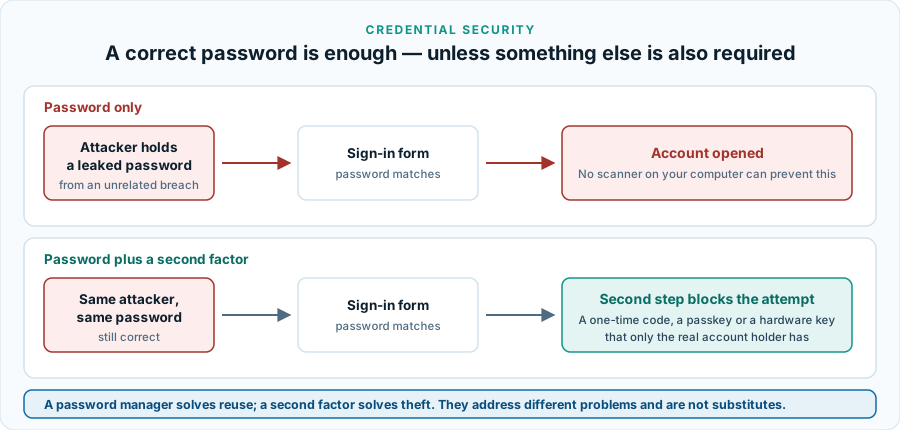
If somebody signs in to your account with the correct password, nothing installed on your computer objects — because from the service’s point of view, nothing unusual has happened. This is the largest category of consumer account compromise, and it is the one security software genuinely cannot reach.
This guide carries no partner links and recommends no purchase. It exists so that the vocabulary in a security product’s marketing means something concrete by the time you read it. How the site is funded is explained in the affiliate disclosure.
Why reuse is the whole problem
Breaches happen to services, not to you. A forum you signed up to in 2014 is compromised, and the address and password you used there end up in a list. Nobody targets you personally; the list is fed to software that tries those pairs automatically against banks, retailers, mail providers and social networks. This is credential stuffing, and it works for exactly one reason: the same password was used somewhere else.
That is why the strength of an individual password matters less than people think, and its uniqueness matters more. A very strong password reused across ten services fails all ten the moment one of them leaks.
What makes a password strong in practice
- Length beats complexity. Substituting a zero for an O adds almost nothing against software that tries those substitutions first. Adding words adds a great deal.
- Uniqueness beats both. A merely adequate password used nowhere else is safer than an excellent one used in five places.
- Unpredictability is what actually counts. A memorable phrase is only strong if nobody could guess the phrase; a famous quotation is a poor choice however long it is.
- Forced periodic changes are out of favour. Modern guidance from national security agencies has moved away from mandatory rotation, because it pushes people towards predictable small variations. Change a password when there is a reason to.
What a password manager does, and what it does not
A password manager is an encrypted vault that generates a different password for every service and fills it for you. What it genuinely solves: reuse, because you no longer have to remember anything; and, less obviously, phishing, because a manager fills credentials by matching the site’s address and will silently decline to fill on a look-alike domain that you would have typed into by hand.
What it does not solve: a compromised device, since a keylogger or an attacker with your unlocked session is inside the trust boundary; a weak or reused master password, which becomes a single point of failure; and the recovery problem, since losing access to the vault means losing access to everything in it. Export or write down the recovery material and keep it somewhere physical.
Several consumer security suites, including Norton’s entry tier, bundle a password manager. A bundled manager is a real product rather than a checkbox, and it is one of the more defensible reasons to buy a suite. The trade-off is that it ties your credential store to a subscription: think about how you would get your data out before you put a decade of logins in. That applies to standalone managers too — check the export function works before you commit.
The second factor, and why they are not equal
A second factor turns a stolen password into a failed sign-in. They are not interchangeable, and the differences matter.
- SMS codes. Much better than nothing and by far the most widely available. Weakest of the options, because a number can be ported away from you and a code can be read out to a convincing caller.
- Authenticator app codes. Generated on your device from a shared secret, with no network involved. Solid, widely supported, and still phishable in real time if you type the code into a fake page.
- Push approvals. Convenient, and vulnerable to fatigue: repeated prompts at three in the morning are a known technique for getting someone to tap “approve”. If a prompt arrives that you did not trigger, deny it and change the password.
- Passkeys. A credential stored on your device and released only to the correct site, unlocked by fingerprint, face or PIN. Because nothing reusable is transmitted, a passkey cannot be handed to a fake page.
- Hardware security keys. The same cryptographic protection in a physical object. The strongest widely available option, and the most inconvenient to replace if lost — register two.
The practical hierarchy: a passkey or hardware key where offered, an authenticator app otherwise, SMS if that is all a service supports. Turning something on beats waiting for the perfect option.
Where to start, if you start anywhere
- Your e-mail account first. It is the recovery route for everything else, which makes it the master key. Give it a unique password and the strongest second factor it supports.
- Then anything holding money — banking, payment services, shopping accounts with a stored card.
- Then the accounts that could impersonate you, which in practice means messaging and social media.
- Then everything else, gradually, as you sign in to each service anyway. Attempting the whole list in one evening is how people give up.
- Check your addresses against known breach data. Several reputable services let you do this. A hit is not an emergency; it is a prompt to change that password and stop using it elsewhere.
Sources and further reading
- ENISA — Threat Landscape, for the standing of credential abuse among attack routes in the EU.
- Europol — Internet Organised Crime Threat Assessment.
- NÚKIB — Czech National Cyber and Information Security Agency, for national guidance.
- FIDO Alliance — passkeys, for how device-bound credentials work.
Terms used here are defined in the glossary. How this guide was researched: our method.