
Recognising a fraudulent message: the signals that keep recurring
Phishing survives every technical defence ever deployed against it, for one reason: it does not attack the software, it attacks the person. That also makes it the one category where a few minutes of pattern recognition genuinely reduces your risk.
This guide carries no partner links and recommends no purchase. It exists so that the vocabulary in a security product’s marketing means something concrete by the time you read it. How the site is funded is explained in the affiliate disclosure.
What the attacker is actually after
Almost every fraudulent message is trying to obtain one of four things: a credential you type into a look-alike page; a payment you authorise yourself; an approval, such as tapping accept on a sign-in prompt or reading out a one-time code; or execution, by opening an attachment that runs something. Knowing which of the four a message is aiming at usually makes its purpose obvious.
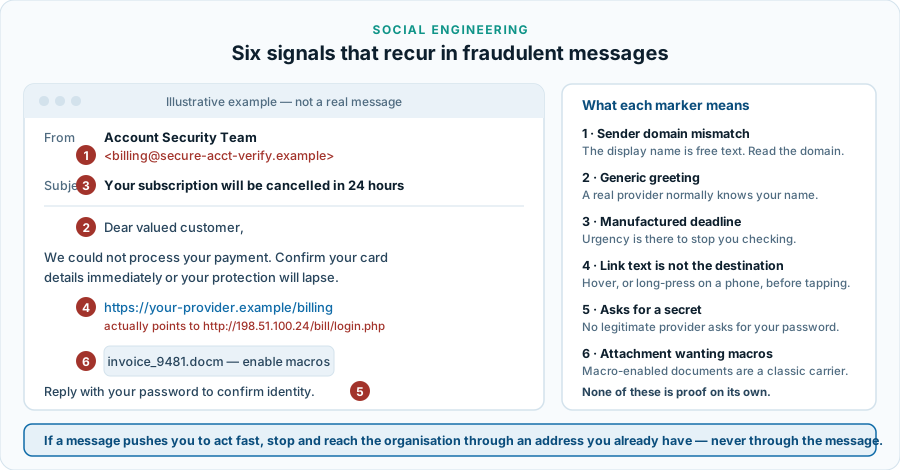
The six signals
- The sending domain does not match the sender. The display name is free text that anyone can set. What cannot be faked as easily is the part after the @. Read it, and be suspicious of near-misses and of plausible-looking subdomains attached to an unfamiliar registered domain.
- A generic greeting. An organisation you have an account with generally knows your name. “Dear valued customer” is a mass mailing.
- A manufactured deadline. Twenty-four hours to act, an account about to be closed, a delivery about to be returned. The urgency exists to stop you checking, and recognising it is the single most useful habit in this guide.
- Link text that is not the destination. Hover on a computer, long-press on a phone, and read where it actually goes before you tap. A raw IP address, a shortener, or a domain that has nothing to do with the brand is the answer.
- A request for a secret. No legitimate provider asks for your password, your full card number or a one-time code — by e-mail, by message or on the telephone. A caller asking you to read out a code you just received is committing fraud, without exception.
- An attachment that wants permission. A document asking you to enable macros or editing to “view content”, or an unexpected invoice in a format that executes. Modern office software blocks macros from the internet by default; a message asking you to work around that is asking you to disable a defence.
The variants worth knowing by name
- Smishing — the same thing by SMS or messaging app. Growing fast, because a link is far harder to inspect on a phone. Parcel-delivery and toll-payment pretexts dominate.
- Vishing — by telephone, often a “bank fraud department” or a “technical support” call about a virus you do not have. Caller ID can be forged. Hang up and call back on a number you already had.
- Quishing — a QR code in place of a link, on a poster, a parking meter or an invoice. The code hides the destination entirely, which is the appeal.
- Invoice and payment-redirection fraud — a real invoice with altered bank details, or a message claiming a supplier has changed account. Verify changed payment details by a channel you chose, never one the message supplied.
- Fake security warnings. A browser page or pop-up announcing an infection and offering a download or a support number. Nothing that appears on a web page can know the state of your computer. This is also the reason we consider a purchase made out of fright a bad purchase, including one made through our own partner links.
Why a scanner cannot solve this
Security software does contribute. Mail and web filtering blocks known-bad senders and destinations before you see them; a link checker flags addresses with a bad reputation; behavioural monitoring catches an attachment that turns out to be a dropper. But when a message leads you to a page that merely looks like your bank, and you type your password into it, nothing malicious has run. There is nothing for a scanner to detect. That is the shape of the problem, and it is why our main article counts credential abuse as one of the routes a security subscription does not close.
If you have already clicked
- Do not spend time on regret. Speed matters more than diagnosis; this happens to careful people constantly.
- Change the password on the affected account, from a different device if you can, and change it anywhere you reused it.
- Check the second factor and the recovery settings. Attackers commonly add their own recovery address or authenticator. Remove anything you do not recognise, and sign out all other sessions.
- Tell your bank if payment details were involved. Card and transfer fraud have time-sensitive routes to recovery.
- Run a full scan if you opened an attachment or ran a downloaded file, and take the machine off the network first if you suspect it is running.
- Report it. Report the message to the impersonated organisation and, where relevant, to your national authority. Readers in the Czech Republic can start with NÚKIB.
- Watch for the follow-up. People who fall for one scam are contacted again, often by a “recovery” service offering to get the money back for a fee. That is the same fraudsters.
Sources and further reading
- ENISA — Threat Landscape, for the standing of phishing and social engineering among attack routes.
- Europol — Internet Organised Crime Threat Assessment, for how online fraud is organised.
- CISA — StopRansomware, for what follows a successful delivery.
- NÚKIB — Czech National Cyber and Information Security Agency.
Terms used here are defined in the glossary. Related: passwords and second factors.